UPSC NDA 2 Application Form Released: Register Now at upsc.gov.in


The Union Public Service Commission (UPSC) officially issued the detailed notification for the National Defence Academy and Naval Academy Examination (II), 2026 on May 20, 2026. The Commission has opened the registration window for 394 highly coveted officer-cadre vacancies across the Army, Navy, and Air Force wings, as well as the 10+2 Cadet Entry Scheme of the Indian Naval Academy.
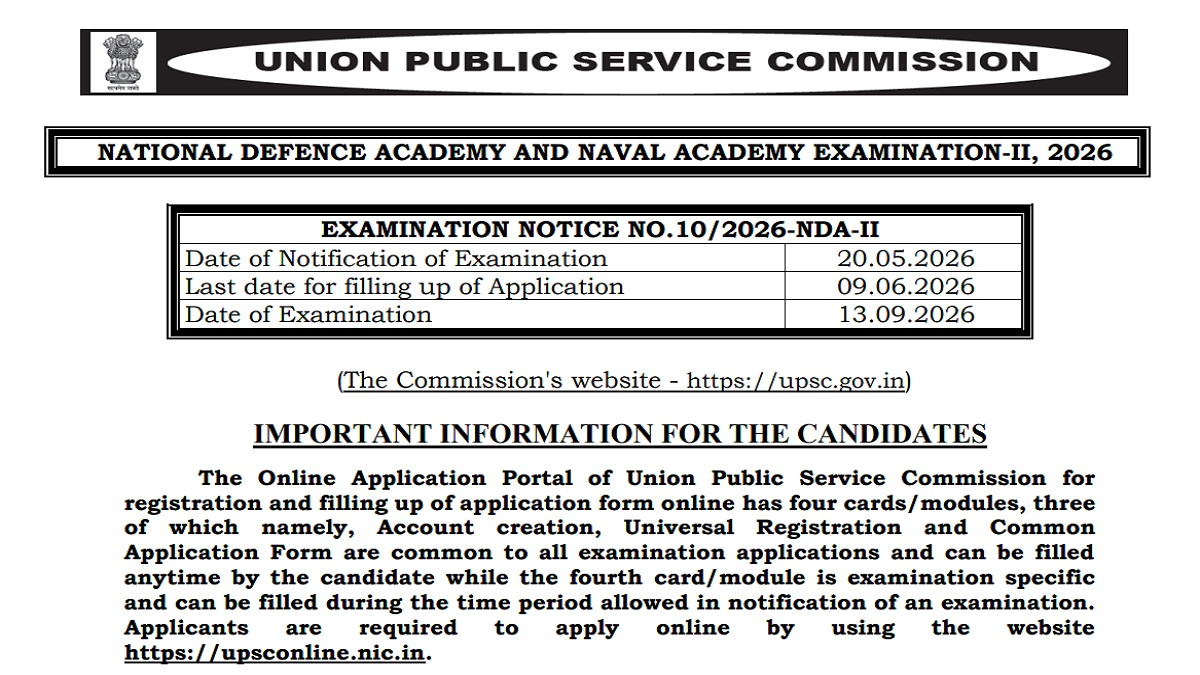
National Defence Academy & Naval Academy Examination (II) 2026 applications have been initiated by the Union Public Service Commission (UPSC). Candidates who wish to appear for this examination may apply via the UPSC website, i.e., upsc.gov.in.
The process for the submission of the UPSC NDA 2 2026 online application will begin from today, May 20, 2026, and the deadline for online application submission is June 9, 2026, at 6:00 PM. Refer to the UPSC website for more details on the date of start of application. The last date to apply is mentioned in the official notification on upsc.gov.in.
Eligibility for UPSC NDA 2 Application:
Citizens of India, as well as certain categories of subjects of Nepal/Bhutan and refugees may be able to see official rules. Applicants should be unmarried male/female with age requirements as given in the notification. Exact birthdate range is given in the official notice.
The candidates are required to have passed Class 12 or 10+2 from a recognized board of education for NDA. Candidates should not be married when they apply or are commissioned.
UPSC NDA 2 2026 Application Form Fees
The application fee for general category applicants is ₹100 while it is exempted for SC/ ST/ Wards of JCOs/NCOs/ORs and female candidates. Application Form fees can be paid through Visa/Master/RuPay Credit/ Debit Card/UPI Payment in SBI branch.
How to Apply Online: UPSC NDA 2 Application
The aspirants may refer to the following process of applying for UPSC NDA Form Application as follows:
-
Access UPSC Online Application Website upsconline.nic.in
-
From homepage, navigate to Account Creation page for new applicants
-
Register yourself by providing email ID, phone number, etc.
-
Verify your email/phone number, set a password, and submit
After creating an account, login using Registered Email ID and password or Registered Phone Number and OTP or Registered Universal Registration Number and password
Kirti Sharma is a content writing professional with 3 years of experience in the EdTech Industry and Digital Content. She graduated with a Bachelor of Arts and worked with companies like ThoughtPartners Global, Infinite Group, and MIM-Essay. Apart from writing, she's a baking enthusiast and home baker. As a Content Writer at Jagran New Media, she writes for the General Knowledge section of JagranJosh.com.



Comments
All Comments (0)
Join the conversation